| .. | ||
| assets | ||
| common | ||
| modules/overview | ||
| services | ||
| README.md | ||
| shell.qml | ||

Quickshell Overview for Hyprland
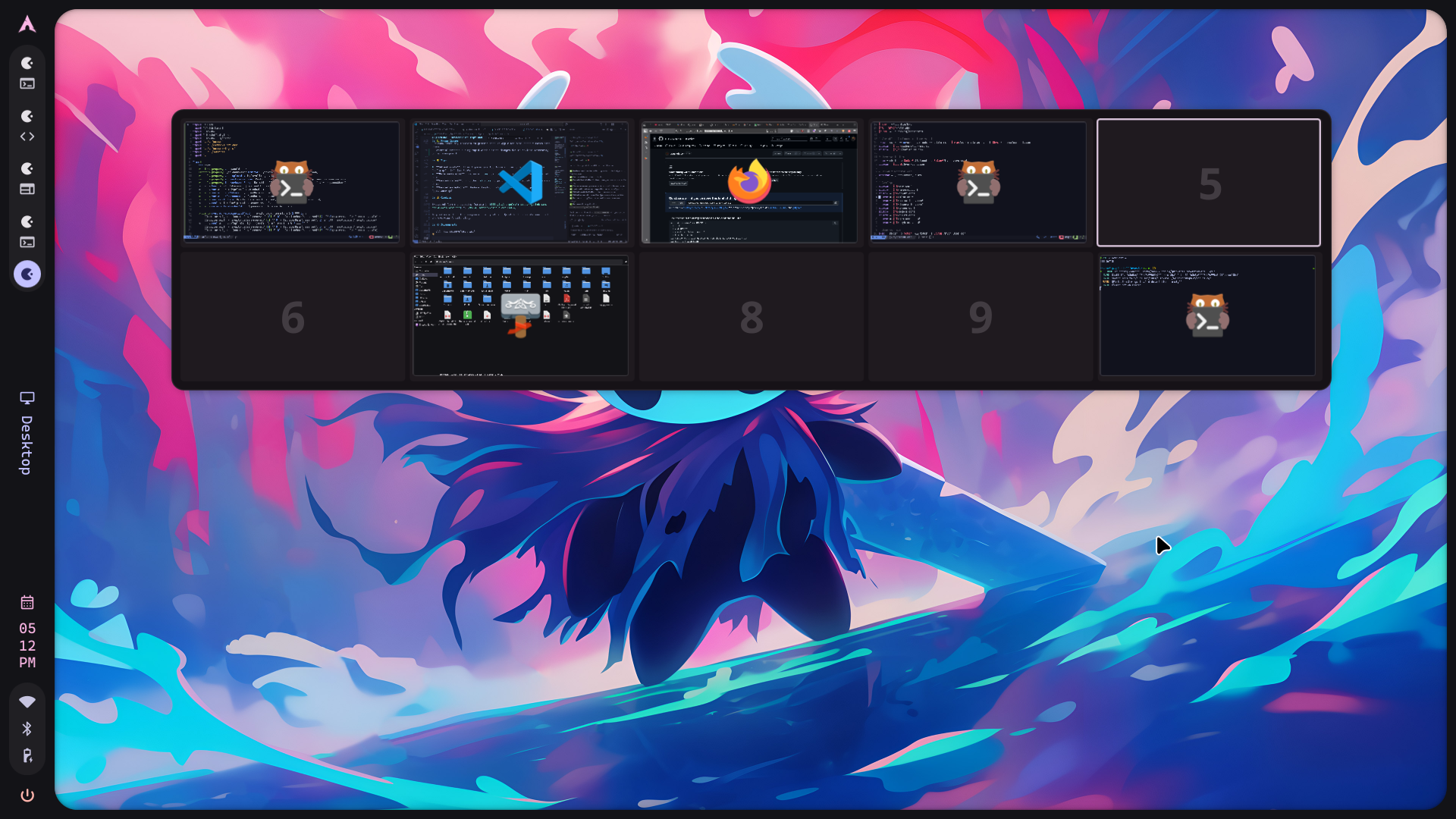
A standalone workspace overview module for Hyprland using Quickshell - shows all workspaces with live window previews, drag-and-drop support, and Super+Tab keybind.




📸 Preview
https://github.com/user-attachments/assets/79ceb141-6b9e-4956-8e09-aaf72b66550c
Workspace overview showing live window previews with drag-and-drop support
✨ Features
- 🖼️ Visual workspace overview showing all workspaces and windows
- 🎯 Click windows to focus them
- 🖱️ Middle-click windows to close them
- 🔄 Drag and drop windows between workspaces
- ⌨️ Keyboard navigation (Arrow keys to switch workspaces, Escape/Enter to close)
- 💡 Hover tooltips showing window information
- 🎨 Material Design 3 theming
- ⚡ Smooth animations and transitions
📦 Installation
Prerequisites
- Hyprland compositor
- Quickshell (installation guide)
- Qt 6 with modules: QtQuick, QtQuick.Controls, Qt5Compat.GraphicalEffects
Setup
-
Clone this repository to your Quickshell config directory:
git clone https://github.com/Shanu-Kumawat/quickshell-overview ~/.config/quickshell/overview -
Add keybind to your Hyprland config (
~/.config/hypr/hyprland.conf):bind = Super, TAB, exec, qs ipc -c overview call overview toggle -
Auto-start the overview (add to Hyprland config):
exec-once = qs -c overview -
Reload Hyprland:
hyprctl reload
Manual Start (if needed)
qs -c overview &
🎮 Usage
| Action | Description |
|---|---|
| Super + Tab | Toggle the overview |
| Left/Right Arrow Keys | Navigate between workspaces horizontally |
| Up/Down Arrow Keys | Navigate between workspace rows |
| Escape / Enter | Close the overview |
| Click workspace | Switch to that workspace |
| Click window | Focus that window |
| Middle-click window | Close that window |
| Drag window | Move window to different workspace |
⚙️ Configuration
⚠️ Want to change the size, position, or number of workspaces?
Edit~/.config/quickshell/overview/common/Config.qml- it's all there!
Workspace Grid
Edit ~/.config/quickshell/overview/common/Config.qml:
property QtObject overview: QtObject {
    property int rows: 2        // Number of workspace rows
    property int columns: 5     // Number of workspace columns (10 total workspaces)
    property real scale: 0.16   // Overview scale factor (0.1-0.3, smaller = more compact)
    property bool enable: true
}
Common adjustments:
- Too small? Increase
scale(try 0.20 or 0.25) - Too big? Decrease
scale(try 0.12 or 0.14) - More workspaces? Change
rowsandcolumns(e.g., 3 rows × 4 columns = 12 workspaces)
Position
Edit ~/.config/quickshell/overview/modules/overview/Overview.qml (line ~111):
anchors {
    horizontalCenter: parent.horizontalCenter
    top: parent.top
    topMargin: 100  // Change this value to move up/down
}
Theme & Colors
Edit ~/.config/quickshell/overview/common/Appearance.qml to customize:
- Colors (m3colors and colors objects)
- Font families and sizes
- Animation curves and durations
- Border radius values
📋 Requirements
- Hyprland compositor (tested on latest versions)
- Quickshell (Qt6-based shell framework)
- Qt 6 with the following modules:
- QtQuick
- QtQuick.Controls
- QtQuick.Layouts
- Qt5Compat.GraphicalEffects
- Quickshell.Wayland
- Quickshell.Hyprland
🚫 Removed Features (from original illogical-impulse)
The following features were removed to make it standalone:
- App search functionality
- Emoji picker
- Clipboard history integration
- Search widget
- Integration with the full illogical-impulse shell ecosystem
📁 File Structure
~/.config/quickshell/overview/
├── shell.qml                      # Main entry point
├── README.md                      # This file
├── hyprland-config.conf          # Configuration reference
├── common/
│   ├── Appearance.qml            # Theme and styling
│   ├── Config.qml                # Configuration options
│   ├── functions/
│   │   └── ColorUtils.qml        # Color manipulation utilities
│   └── widgets/
│       ├── StyledText.qml        # Styled text component
│       ├── StyledRectangularShadow.qml
│       ├── StyledToolTip.qml
│       └── StyledToolTipContent.qml
├── services/
│   ├── GlobalStates.qml          # Global state management
│   └── HyprlandData.qml          # Hyprland data provider
└── modules/
    └── overview/
        ├── Overview.qml          # Main overview component
        ├── OverviewWidget.qml    # Workspace grid widget
        └── OverviewWindow.qml    # Individual window preview
🎯 IPC Commands
# Toggle overview
qs ipc -c overview call overview toggle

# Open overview
qs ipc -c overview call overview open

# Close overview
qs ipc -c overview call overview close
🐛 Known Issues
- Window icons may fallback to generic icon if app class name doesn't match icon theme
- Potential crashes during rapid window state changes due to Wayland screencopy buffer management
Credits
Extracted from the overview feature in illogical-impulse by end-4.
Adapted as a standalone component for Hyprland + Quickshell users who want just the overview functionality.
Note: Maintenance will be limited due to time constraints, but PRs and code improvements are welcome! Feel free to contribute or fork for your own needs.
Made with ❤️ for the Hyprland community